
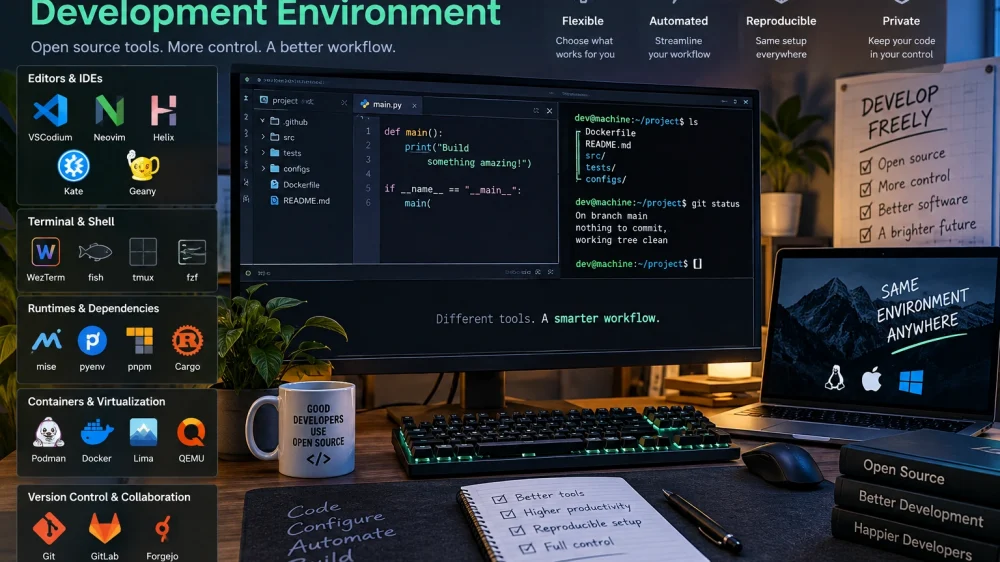
Modern developers increasingly prefer customized development environments instead of depending on a single all-in-one IDE. Combining open-source tools gives programmers more control over automation, configuration, reproducibility, and privacy while allowing each component of the workflow to be replaced independently. A modern setup usually combines a code editor, terminal, runtime manager, dependency tools, containers, and version control.
What makes a good open-source development environment
A good development environment should be fast, reproducible, configurable, and easy to maintain across different projects and machines.
The main advantage of building an environment from open-source components is control. Developers can decide exactly which editor, shell, extensions, language runtimes, and automation tools they need instead of accepting everything included in a large IDE. This can reduce unnecessary resource consumption and make the workflow easier to adapt.
Reproducibility is equally important. A developer should be able to move a project to another computer or give it to a teammate without spending hours recreating the environment manually. Configuration files, package manifests, containers, and version control make this possible.
Privacy can also be an advantage. Many open-source development tools can run entirely locally, allowing organizations to reduce their dependence on cloud services when source code or project data should remain inside controlled infrastructure.
Best open-source code editors and IDE alternatives
The editor is the center of the development workflow, but modern open-source options range from lightweight text editors to highly extensible environments capable of replacing traditional IDEs.
- VSCodium — a community-driven distribution of Microsoft’s open-source VS Code codebase without Microsoft’s proprietary branding and telemetry components. It supports a familiar interface and a large ecosystem of extensions.
- Neovim — a highly configurable editor particularly popular among developers who prefer keyboard-driven workflows and extensive automation.
- Helix — a modern terminal-based editor with built-in support for features such as multiple selections, syntax parsing, and the Language Server Protocol.
- Kate — a feature-rich KDE editor offering project management, terminal integration, sessions, plugins, and development-oriented functionality.
- Geany — a lightweight editor with IDE-style features that can be useful when low resource consumption and quick startup are priorities.
There is no universal editor that works best for every developer. VSCodium can provide an approachable graphical environment, while Neovim and Helix are attractive for developers who want a terminal-centered workflow. Lightweight alternatives such as Geany can be practical on older hardware or for smaller projects.
Terminal and shell tools that improve the development workflow
A well-configured terminal can become one of the most powerful parts of a custom development environment by making navigation, searching, scripting, and repetitive operations faster.
- WezTerm — a cross-platform terminal emulator with extensive configuration options, tabs, panes, and GPU-accelerated rendering.
- fish — an interactive shell designed around convenient defaults, including suggestions, syntax highlighting, and command completion.
- tmux — a terminal multiplexer that allows several terminal sessions and panes to run inside a single interface and remain active in the background.
- fzf — a general-purpose fuzzy finder that can dramatically accelerate searches through files, command history, Git branches, and other lists.
Additional command-line utilities can improve everyday operations even further. Tools such as ripgrep provide extremely fast text searching, while fd offers a convenient alternative for locating files. The goal is not to install as many utilities as possible but to remove friction from operations performed dozens of times every day.
Open-source tools for managing languages, runtimes, and dependencies
Runtime and dependency management is essential for preventing conflicts between projects that require different versions of languages, libraries, or build tools.
Modern development frequently involves several ecosystems on the same workstation. One application might require a particular Python release, another a newer Node.js runtime, and a third could depend on Rust or Java. Installing everything globally can eventually produce dependency conflicts and make upgrades difficult.
Tools such as mise can manage multiple development runtimes through project configuration. Language-specific solutions remain useful as well: pyenv can manage Python versions, while package managers such as pnpm, uv, Cargo, and others handle dependencies within their respective ecosystems.
Dependency definitions should ideally be stored alongside the project’s source code. Lock files are particularly valuable because they help ensure that developers and automated build systems install consistent dependency versions rather than unexpectedly receiving different releases.
How containers and local virtualization help create reproducible environments
Containers and virtual machines isolate development workloads from the host system, making projects easier to reproduce, test, migrate, and eventually deploy.
- Podman — an open-source container engine supporting daemonless operation and workflows that can run containers without requiring root privileges.
- Docker Engine — the open-source container runtime underlying many familiar container development workflows.
- Lima — a tool for running Linux virtual machines, particularly useful for Linux-based development environments on macOS.
- QEMU — a mature open-source machine emulator and virtualization platform capable of supporting complete virtualized operating systems.
Containers are especially useful when an application depends on databases, message queues, specific system libraries, or other infrastructure. Instead of asking every developer to configure these components manually, a project can describe much of its environment in configuration files.
Virtual machines provide stronger separation when an entire operating system needs to be reproduced. They consume more resources than typical containers but remain valuable for operating-system testing, security research, compatibility work, and infrastructure development.
Best open-source tools for version control and collaboration
Version control should cover not only application code but also the configuration required to reconstruct the development environment.
Git remains the foundation of most modern source-control workflows. Developers can store application code, scripts, container definitions, editor configuration, infrastructure files, and documentation in repositories, creating a traceable history of how the project changes.
Open-source Git hosting platforms can extend this workflow. GitLab Community Edition provides repository hosting alongside collaboration and CI/CD capabilities, while Forgejo offers a lightweight self-hosted software forge. These platforms are useful for teams that want greater control over where repositories and development infrastructure are hosted.
Command-line interfaces and terminal Git tools can complement these platforms. However, the most important principle is consistency: branches, commits, reviews, automated checks, and releases should follow a workflow that every contributor can understand.
How to combine these tools into a practical development stack
The most effective custom environment is usually built gradually around a real workflow rather than assembled from a long list of popular tools.
- Choose the editor. Start with VSCodium for a conventional graphical workflow or consider Neovim or Helix if terminal-based editing is preferable.
- Configure the terminal. Select a terminal emulator and shell, then add utilities such as fzf and ripgrep only where they solve recurring problems.
- Isolate runtimes and dependencies. Use version managers and project-level dependency files instead of relying heavily on globally installed packages.
- Containerize external services. Databases, caches, queues, and other supporting infrastructure can be described as containers so the environment is easier to reproduce.
- Store configuration in Git. Keep important setup files, scripts, dependency definitions, and documentation under version control so a new machine can recreate the environment with minimal manual work.
This approach produces a modular stack. For example, a developer might combine VSCodium, WezTerm, fish, mise, Podman, Git, and Forgejo while keeping project-specific configuration inside each repository. Another developer could replace the editor and terminal without changing the underlying project workflow.
What to consider before building your own development environment
Customization creates flexibility, but every additional component also introduces configuration, maintenance, compatibility, and security responsibilities.
Before replacing an established IDE, consider how much time the custom environment will actually save. A heavily customized setup can become counterproductive when configuration requires constant maintenance or when team members cannot reproduce it.
Cross-platform compatibility also matters. Developers working across Windows, Linux, and macOS should check whether their chosen tools behave consistently on every required platform. Automated setup scripts and documented configuration can reduce these differences.
Security should be treated as part of the environment rather than an afterthought. Extensions, packages, container images, plugins, and shell scripts can all execute code, so dependencies should come from trusted sources and be updated regularly.
The strongest open-source development environment is therefore not necessarily the one containing the most tools. It is the one that remains understandable, reproducible, secure, and easy to rebuild. By combining a carefully selected editor, terminal utilities, runtime management, containers, and Git-based collaboration, developers can create a flexible workspace that evolves alongside their projects instead of locking their workflow into a single application.